
Family photographs tell the story of who we are and where we come from. Every box of old prints tucked away in a closet represents decades of memories that are slowly deteriorating. Digitizing and preserving these photos ensures they survive for future generations to discover and cherish, long after the original prints have faded beyond recognition.
Why Digital Preservation Matters
Physical photographs are fragile. They are vulnerable to water damage from floods and leaks, fire, mold growth in humid environments, insect damage, and the slow but inevitable chemical deterioration of photographic paper and dyes. Natural disasters alone destroy millions of irreplaceable family photos every year.
Digital copies, when properly backed up, are virtually indestructible. They can be stored in multiple locations simultaneously, copied without any quality loss, and shared instantly with family members around the world. A properly archived digital photo collection can survive indefinitely, preserving your family history for generations to come.
Step 1: Gather and Organize Your Photos
Before scanning, collect all your physical photos into one place. Sort them roughly by decade or family branch. Check for duplicates and set aside any that are severely damaged for special handling later. Note any writing on the backs of photos, including dates, names, and locations, as this information is invaluable for future family members.
If you have photos stored in old albums, be cautious when removing them. Some adhesive album pages can damage photos during removal. If a photo is stuck firmly, it may be safer to scan the entire album page rather than risk tearing the print.
Step 2: Digitize with Quality in Mind
For the best digital preservation, use a flatbed scanner at 600 DPI or higher. This captures enough detail to produce high-quality reprints and gives AI restoration tools plenty of data to work with. Save your scans in a lossless format like TIFF for the archive copy, and create JPEG versions for everyday sharing and viewing.
If you do not have a scanner, smartphone scanning apps can produce surprisingly good results. The key is to photograph each print in even, indirect lighting with no shadows falling across the surface. Hold your phone steady and parallel to the photo to avoid perspective distortion. Some scanning apps automatically correct for angle and lighting.
Step 3: Restore and Enhance with AI
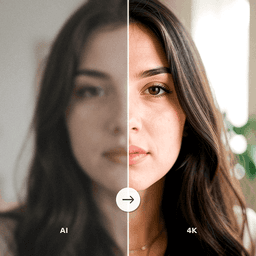
Once your photos are digitized, use AI photo restoration to bring them back to their best possible condition. AI enhancement can remove scratches, correct faded colors, sharpen blurry details, and even add color to black and white images. This step transforms aging prints into vibrant digital images that look as good as or better than the originals did when new.
Pay special attention to photos of family members who are no longer alive. These images are particularly irreplaceable and deserve the best possible restoration. AI face enhancement can bring remarkable clarity and detail to faces that have become indistinct over the years.
Step 4: Implement a Backup Strategy
The golden rule of digital preservation is the 3-2-1 backup strategy: keep at least three copies of your files, on at least two different types of storage media, with at least one copy stored off-site. A practical implementation would be keeping files on your computer's hard drive, backed up to an external drive, and synced to a cloud storage service.
- Cloud storage: Services like Google Drive, iCloud, or Dropbox provide automatic off-site backup that protects against local disasters.
- External hard drives: Affordable and easy to use for large photo collections. Store one at a different physical location than your primary copy.
- Shared family access: Distribute copies to other family members so the collection survives even if one person's copies are lost.
Step 5: Share and Enjoy Your Preserved Collection
Digital photos are meant to be seen and shared. Create shared albums for family members, print the best restored images as gifts, and consider creating a family photo book that tells your family's story across generations. You might also record the stories behind important photos while older family members can still share their memories.
Preserve Your Family Photos with ClearPastAI
ClearPastAI makes the restoration step effortless. Upload your scanned old photos and let AI enhance, restore, and colorize them automatically. Preserve your family memories in stunning digital quality that will last for generations. Download the app today.
Free to try. No account required.