
Old photographs are among the most personal and irreplaceable items we own. Whether you have inherited a box of vintage family photos or rediscovered your own collection from decades ago, restoring these images can bring faded memories back to vivid life. Here are ten practical tips for getting the best results from old photo restoration and recovery.
1. Handle Physical Prints with Care
Before scanning, always handle old photos with clean, dry hands or cotton gloves. Old photographic paper is fragile and can be damaged by oils and moisture from your skin. Never bend or flex old prints, and avoid using paper clips or rubber bands to group them. Place photos face-up on a clean, flat surface when preparing them for digitization.
2. Scan at the Highest Resolution Possible
When digitizing old photos, scan at a minimum of 600 DPI for standard prints and 1200 DPI or higher for small prints and negatives. Higher resolution captures more detail from the original and gives AI restoration tools more information to work with. Save scans in a lossless format like TIFF or PNG to preserve maximum quality for restoration.
3. Clean Before Scanning
Gently remove loose dust and debris from old photos before scanning. Use a soft, lint-free cloth or a very gentle air blower. Never use liquid cleaners or wet cloths on old photographic prints, as moisture can cause irreversible damage to the emulsion layer. For photos stuck to glass or each other, consult a professional conservator rather than attempting to separate them yourself.
4. Document the Originals
Before you begin any restoration work, scan the originals in their current condition and save these files separately. This preserves the documentary record of each photo, including any writing on the back, stamps, or other historical information. You can always refer back to the unaltered scan if needed.
5. Address One Problem at a Time
When restoring a heavily damaged photo, tackle issues individually rather than applying all corrections at once. Start with structural damage like tears and scratches, then move to color and tone corrections, and finish with detail enhancement and sharpening. This layered approach gives you more control and produces better results than a single all-in-one pass.
6. Use AI Restoration Tools for Efficiency
AI-powered image enhancers have dramatically reduced the time and skill required for photo restoration. What used to take a professional editor hours of painstaking manual work can now be accomplished in seconds. Modern AI restoration tools can remove scratches, correct fading, enhance faces, colorize black and white images, and upscale resolution automatically.
7. Pay Special Attention to Faces
Faces are typically the most important part of any family photo. When restoring old photos, use tools that include dedicated face enhancement capabilities. AI models specifically trained on facial features produce much more natural and recognizable results than generic enhancement algorithms. If faces are severely degraded, consider cropping and enhancing them individually.
8. Maintain Realistic Expectations
AI photo recovery is remarkably effective, but it has limits. Severely damaged areas where the image content is completely destroyed cannot be perfectly reconstructed. The AI can make educated predictions about missing content, but these are approximations. For severely damaged photos, the goal should be to make the image presentable and enjoyable rather than pixel-perfect.
9. Back Up Everything
Store your original scans, intermediate edits, and final restored images in at least two separate locations. Use cloud storage for one backup and a local external drive for another. Digital files are much more durable than physical prints, but only if properly backed up. Consider organizing your restored photos in a dedicated folder structure with dates and descriptions.
10. Share and Preserve Your Restored Photos
Once your photos are restored, share them with family members. Create digital albums, order high-quality reprints, or compile photo books. Restored old photos make meaningful gifts and help connect younger generations with their family history. The effort you put into restoration becomes even more valuable when the results are shared and enjoyed.
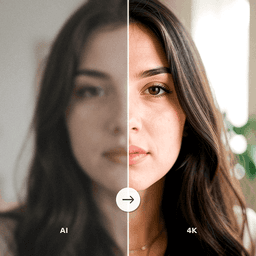
Start Restoring Your Old Photos
ClearPastAI puts professional-grade AI photo restoration in your pocket. Restore faded colors, remove scratches, enhance faces, and recover old damaged photos with just a few taps. Download the app and start preserving your family memories today.
Free to try. No account required.