
Old photographs carry irreplaceable memories, but time takes its toll on physical prints. Fading, scratches, water damage, and discoloration can make these precious images difficult to appreciate. Fortunately, AI photo restoration has made it possible for anyone to bring old photos back to life without professional editing skills.
Why Old Photos Deteriorate Over Time
Printed photographs are vulnerable to environmental damage from the moment they are developed. Exposure to light causes gradual fading of dyes and pigments, while humidity and temperature fluctuations accelerate chemical breakdown. Physical handling introduces scratches, fingerprints, and creases. Even properly stored photos will slowly degrade as the chemical compounds in photographic paper break down over decades.
Common types of damage found in old photos include yellowing or brown discoloration, loss of contrast, faded colors, surface scratches, torn edges, water stains, and mold spots. Each of these issues presents a unique challenge for restoration, and traditional manual repair can take hours of painstaking work per image.
How AI Photo Restoration Works
AI image restoration uses deep learning models trained on millions of photographs to understand what undamaged images should look like. When you feed a damaged old photo into an AI enhancer, the model analyzes the image pixel by pixel, identifying areas of damage and predicting what the original content looked like before deterioration occurred.
Key AI Restoration Capabilities
- Scratch and damage repair: AI detects and fills in scratched or torn areas with realistic detail that matches the surrounding image content.
- Color restoration: Faded and yellowed photos are corrected to display natural, accurate colors that reflect the original scene.
- Detail enhancement: Blurry or low-resolution areas are sharpened and upscaled, revealing details that were previously hard to see.
- Face restoration: Faces in old photos receive special attention, with AI reconstructing facial features to look sharp and natural.
Step-by-Step: Restoring an Old Photo with AI
1. Digitize the Original Print
Start by scanning or photographing the old print at the highest resolution possible. A flatbed scanner at 600 DPI or higher is ideal. If you are using a smartphone camera, photograph the print in even, diffused lighting to avoid glare and shadows. The better your scan quality, the better the AI restoration result will be.
2. Upload to an AI Restoration Tool
Choose a reliable AI photo restoration app and upload your scanned image. Look for a tool that offers multiple enhancement options such as scratch removal, color correction, sharpening, and upscaling so you can address each type of damage separately or all at once.
3. Select Enhancement Options
Depending on your photo's condition, select the appropriate restoration features. For a heavily faded black and white photo, you might choose colorization along with contrast recovery. For a scratched color print, focus on damage repair and color correction. Most AI tools allow you to preview results before committing.
4. Review and Save
Compare the restored version against the original to ensure the AI has accurately interpreted the image. Save the restored photo in a high-quality format and consider backing it up to cloud storage. Keep the original scan as well so you always have the unaltered version available.
Tips for the Best Restoration Results
To get the most from AI old photo restoration, always start with the highest quality scan you can produce. Clean the original print gently before scanning to remove loose dust. Process one enhancement at a time when dealing with severe damage, rather than applying all corrections simultaneously. This gives you more control over the final result and prevents over-processing.
For photos with significant physical damage like tears or missing sections, you may get the best results by combining AI restoration with minimal manual touch-ups. The AI handles the bulk of the work, and you can fine-tune specific areas if needed.
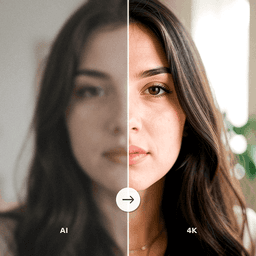
Restore Your Old Photos Today
ClearPastAI makes old photo restoration effortless. Upload your damaged, faded, or scratched photos and let our AI image enhancer restore them in seconds. Download the app and start preserving your family memories today.
Free to try. No account required.