
Not every photo comes out looking its best. Low light, poor camera quality, heavy compression, and physical age can all degrade image quality. The good news is that AI-powered photo enhancement tools have made it possible to dramatically improve photo quality with minimal effort, turning mediocre images into sharp, vibrant photographs.
What Determines Photo Quality
Photo quality is determined by several measurable factors: resolution, sharpness, noise level, color accuracy, dynamic range, and compression artifacts. A high-quality photo has sufficient resolution for its intended display size, sharp detail throughout the important areas, low noise, accurate colors, and smooth tonal gradations from shadows to highlights.
When any of these factors falls below acceptable levels, the photo appears low quality. Understanding which specific quality issues affect your image helps you choose the right enhancement approach. An AI image enhancer typically addresses multiple quality factors simultaneously, but knowing the primary problem guides your workflow.
Key AI Enhancement Technologies
AI Noise Reduction
Digital noise appears as random speckles of color or brightness in photos, particularly those taken in low light or at high ISO settings. Traditional noise reduction works by blurring the image slightly, which reduces noise but also destroys detail. AI noise reduction selectively removes noise while preserving and even enhancing underlying detail, producing clean images that remain sharp.
AI Sharpening and Detail Recovery
AI sharpening goes far beyond traditional unsharp mask techniques. Rather than simply increasing edge contrast, AI models understand what sharp detail should look like for different types of content such as hair, fabric, foliage, and architecture. The AI generates genuine detail that makes images look naturally sharp, not artificially processed.
Resolution Enhancement
AI upscaling increases the pixel dimensions of your image while generating new detail that maintains natural-looking sharpness at the larger size. This is essential for printing low-resolution images or displaying old digital photos on modern high-resolution screens. The best AI upscalers can enlarge images by 2x to 4x while maintaining impressive sharpness.
JPEG Artifact Removal
Photos that have been heavily compressed as JPEGs often show blocky artifacts, color banding, and loss of fine detail. AI can detect and remove these compression artifacts, restoring smooth gradients and clean detail that was degraded during compression. This is particularly valuable for images shared through messaging apps that apply aggressive compression.
A Practical Enhancement Workflow
For the best results when improving photo quality, follow this order of operations. First, apply noise reduction to clean up the image without losing detail. Next, correct color and exposure to ensure accurate tones and good dynamic range. Then apply sharpening and detail enhancement to bring out texture and clarity. Finally, upscale the resolution if a larger image is needed.
Many AI enhancement tools handle all of these steps in a single pass, analyzing the image holistically and applying appropriate corrections for each quality factor. This integrated approach often produces more natural results than applying each enhancement separately, as the AI can balance competing adjustments against each other.
When to Enhance and When to Reshoot
AI photo enhancement is remarkably powerful, but it is not a substitute for good photography fundamentals. If you have the opportunity to retake a photo in better conditions, that will almost always produce a superior result compared to enhancing a poor original. AI enhancement is most valuable for irreplaceable moments, old photos, and situations where reshooting is simply not possible.
That said, even well-captured photos can benefit from AI enhancement. Professional photographers increasingly use AI tools to polish their work, saving time on routine corrections and allowing them to focus on creative decisions. AI enhancement is a powerful tool whether you are recovering an old photo or refining a recent one.
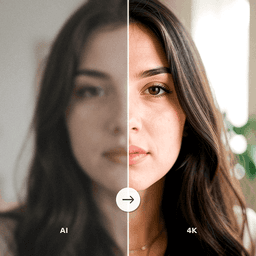
Enhance Your Photo Quality with AI
ClearPastAI is your all-in-one AI image enhancer for improving photo quality. From noise reduction and sharpening to color correction and upscaling, transform any photo into a stunning, high-quality image. Download the app and see the difference AI enhancement makes.
Free to try. No account required.