
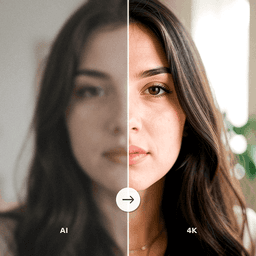
We have all been there: you capture what should be a perfect moment, only to discover the photo came out blurry. Whether caused by camera shake, poor focus, or subject movement, blurry photos used to be considered lost causes. AI enhancement technology has changed that, making it possible to recover sharp detail from images that once seemed beyond repair.
Understanding Why Photos Come Out Blurry
Blur in photographs has several distinct causes, and understanding them helps set realistic expectations for AI enhancement results. Motion blur occurs when the camera or subject moves during exposure, creating streaked or smeared details. Out-of-focus blur happens when the lens is not properly focused on the subject, producing soft, undefined edges. Camera shake introduces a uniform blur across the entire image from hand movement during capture.
Each type of blur presents a different challenge for restoration. Motion blur retains directional information that AI can use to reconstruct detail. Focus blur is more difficult because the information was never sharply captured. However, modern AI image enhancers can address all these types with impressive results.
How AI Deblurring and Sharpening Works
AI photo sharpening works differently from traditional sharpening tools. Classic sharpening simply increases contrast along edges, which can amplify noise and create artifacts. AI deblurring uses neural networks that have learned what sharp detail looks like by studying millions of image pairs, where the same scene is represented in both blurry and sharp versions.
When you feed a blurry photo to an AI enhancer, the model predicts what the sharp version of that image would look like. It reconstructs edges, recovers texture detail, and fills in information that was lost to blur. This process generates genuinely new detail rather than just enhancing what is already visible, which is why AI results are dramatically better than traditional sharpening filters.
Types of Blur AI Can Fix
Camera Shake and Motion Blur
AI excels at correcting camera shake because the blur follows a consistent pattern across the image. The model can detect the direction and magnitude of the shake and reverse its effect. Motion blur from moving subjects is handled similarly, though results depend on the severity of the movement.
Mild to Moderate Focus Blur
When a photo is slightly out of focus, AI enhancement can recover a surprising amount of detail. Faces that appear soft and undefined can be sharpened to reveal clear features. Text that is difficult to read can become legible. However, extremely out-of-focus images where subjects are entirely unrecognizable are beyond what current AI can fully recover.
Low-Light Noise and Blur
Photos taken in low-light conditions often suffer from both blur and digital noise. AI enhancement handles both issues simultaneously, reducing noise grain while sharpening image detail. This combined approach produces cleaner, clearer results than addressing each problem separately.
Getting the Best Results from AI Photo Sharpening
- Use the highest resolution version of the blurry photo available. AI has more data to work with in larger images.
- Avoid applying traditional sharpening before using AI enhancement, as this can introduce artifacts that confuse the AI model.
- For group photos, crop and enhance individual faces separately for the sharpest facial detail.
- Set realistic expectations: moderately blurry photos yield excellent results, while extremely blurred images will show improvement but may not become perfectly sharp.
Preventing Blurry Photos in the Future
While AI can rescue many blurry photos, prevention is always better than correction. Use your camera or smartphone's stabilization features. Brace your arms or use a stable surface when shooting in low light. Ensure your lens is clean, as smudges cause a soft blur across the entire image. When photographing moving subjects, increase the shutter speed to freeze motion.
Sharpen Your Blurry Photos with AI
ClearPastAI uses advanced AI enhancement to fix blurry photos and restore stunning clarity to your images. Whether it is camera shake, focus issues, or low-light blur, our AI image enhancer brings your photos back into sharp focus. Try it today.
Free to try. No account required.