
Whether you need to enlarge an old photo for printing, prepare images for a high-resolution display, or recover detail from a small thumbnail, AI image upscaling has become an essential tool. Unlike traditional resizing that simply stretches pixels, AI upscalers generate new detail to create sharp, natural-looking enlarged images.
How AI Image Upscaling Works
Traditional image resizing uses interpolation algorithms like bicubic or bilinear to estimate new pixel values when enlarging an image. These methods produce soft, blurry results because they can only average existing pixel data. AI upscaling takes a fundamentally different approach by using deep learning models to predict what additional detail should exist at higher resolutions.
Super-resolution neural networks are trained on pairs of low and high-resolution images, learning the relationship between coarse structures and fine detail. When given a low-resolution input, the AI generates realistic texture, sharp edges, and fine detail that are consistent with the image content. The result is an enlarged photo that looks naturally sharp rather than artificially stretched.
What to Look for in an AI Upscaler
Maximum Upscale Factor
Most AI upscalers offer 2x to 4x enlargement, with some supporting up to 8x or even 16x. Higher factors produce more impressive size increases but require the AI to generate more predicted detail. For most practical purposes, 2x to 4x provides an excellent balance between size increase and quality retention.
Detail Preservation and Generation
The best AI image enhancers preserve existing detail while adding new detail that looks natural and consistent. Look for upscalers that handle textures like hair, fabric, and foliage well, as these are common areas where lesser tools produce artifacts or unnatural patterns.
Face Enhancement
If you frequently upscale photos of people, choose an upscaler with dedicated face enhancement. Generic upscaling can sometimes produce unnatural facial features at high magnification. Face-specific AI models understand facial structure and produce much more realistic results for portraits and group photos.
Processing Speed and Convenience
Cloud-based upscalers require uploading your images and waiting for server processing, which can be slow for large files. On-device solutions process images locally on your phone or computer, offering faster results and better privacy since your photos never leave your device.
AI Upscaling Use Cases
- Printing old photos: Enlarge small prints or low-resolution scans to produce sharp, high-quality prints suitable for framing.
- Social media and web: Upscale images to meet platform requirements for high-resolution display on modern screens.
- Cropping and enlarging: Crop a specific area of a photo and upscale it without losing sharpness, perfect for isolating subjects from group photos.
- Restoring old digital photos: Early digital cameras produced images at very low resolutions by today's standards. AI upscaling brings these photos up to modern quality levels.
Tips for Best Upscaling Results
Start with the best quality source image available. Remove noise and correct color issues before upscaling, as the AI will amplify any existing problems along with the detail. For extremely small images, consider upscaling in stages, going from 2x to 4x rather than jumping straight to 4x, which can sometimes produce more natural results.
Keep in mind that AI upscaling works best on photographs and natural images. Graphics, screenshots, and text-heavy images may benefit more from specialized upscaling tools designed for those content types. The AI models used for photo upscaling are optimized for the textures and patterns found in photographic content.
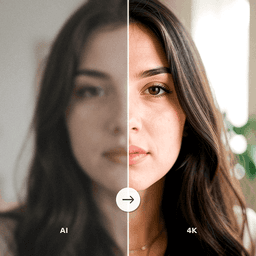
Upscale Your Photos with AI
ClearPastAI includes a powerful AI image upscaler that increases your photo resolution while adding natural, sharp detail. Whether you are restoring old prints or enlarging recent photos, get professional-quality results right from your phone. Try ClearPastAI free and see the difference.
Free to try. No account required.