
The rise of AI image enhancement tools has sparked an important question among photographers and hobbyists alike: should you use AI to enhance your photos or stick with traditional manual editing? The answer depends on your goals, skill level, and the specific situation. Here is an honest comparison of both approaches to help you decide.
Understanding AI Photo Enhancement
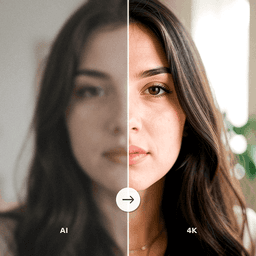
AI photo enhancement uses machine learning models to automatically analyze and improve images. These tools can sharpen blurry photos, reduce noise, correct colors, remove scratches, upscale resolution, and even colorize black and white images. The AI makes decisions about what corrections to apply based on patterns learned from millions of training images.
The key advantage is speed and accessibility. AI enhancement requires no technical knowledge of photo editing. You upload an image, the AI processes it, and you receive an enhanced version within seconds. This democratizes photo restoration, making it available to anyone regardless of their editing skills.
Understanding Manual Photo Editing
Manual editing uses software like Adobe Photoshop or Lightroom where the editor controls every adjustment directly. This includes manipulating curves and levels, using healing brushes for spot corrections, applying layer masks for selective adjustments, and fine-tuning every parameter by hand. Manual editing offers complete creative control over the final result.
The trade-off is that manual editing requires significant skill and time investment. Learning professional photo editing takes months or years of practice, and even experienced editors can spend hours on a single restoration project. For complex work, the results can be exceptional, but the barrier to entry is substantial.
AI Enhancement: Pros and Cons
Advantages
- Speed: Process images in seconds rather than hours. Ideal for large batches of old family photos.
- No skill required: Anyone can achieve professional-looking results without training in photo editing.
- Consistency: AI applies corrections evenly across the image and produces reliable results.
- Capabilities beyond manual reach: AI can generate detail, colorize images, and reconstruct faces in ways that are extremely difficult to do manually.
Limitations
- Less creative control: You accept the AI's interpretation of how the image should look.
- Occasional artifacts: AI can sometimes produce unnatural details, especially with unusual image content.
Manual Editing: Pros and Cons
Advantages
- Full creative control: Every pixel is under your command. You decide exactly how the final image looks.
- Artistic expression: Manual editing allows for creative color grading, compositing, and stylistic choices beyond simple correction.
- Precision for specific corrections: You can target exactly the area that needs work without affecting the rest of the image.
Limitations
- Steep learning curve: Professional-level results require months or years of practice.
- Time-intensive: Complex restorations can take hours per image.
- Software costs: Professional editing software requires paid subscriptions.
When to Use Each Approach
Choose AI enhancement when you need to process many photos quickly, when you want to restore old family photos without learning complex software, when you need to fix blurry images or colorize black and white photos, or when you want quick results for sharing on social media.
Choose manual editing when you need precise creative control over the final look, when working on commercial or fine art photography, or when the AI produces results you want to fine-tune further.
Combine both approaches for the best of both worlds. Use AI for the heavy lifting of restoration, sharpening, and color correction, then apply manual adjustments for creative finishing touches. Many professional photographers now use this hybrid workflow to save time while maintaining creative control.
Experience AI Photo Enhancement
ClearPastAI delivers professional-quality AI photo enhancement that rivals hours of manual editing work. Whether you are restoring old images, fixing blurry photos, or enhancing image quality, get stunning results in seconds. Download the app and discover how powerful AI enhancement can be.
Free to try. No account required.