
Color accuracy is one of the most important aspects of a great photograph. Incorrect white balance, faded pigments, color casts from artificial lighting, and age-related deterioration can all distort the colors in your images. AI color correction technology can analyze and fix these issues automatically, producing natural, balanced colors in seconds.
Common Color Problems in Photography
White Balance Issues
White balance determines how color temperature is rendered in your photos. When set incorrectly, images can have an overall blue, orange, or green tint. Indoor photos taken under fluorescent lighting often have a green cast, while tungsten bulbs create an orange warmth. AI color correction detects these shifts and neutralizes them to produce accurate, natural colors.
Faded and Aged Colors
Old printed photographs gradually lose color intensity as the dyes in the photographic paper break down. This fading is rarely uniform: reds and yellows tend to fade faster than blues and greens, resulting in color-shifted images that look unnatural. AI enhancement can analyze the fading pattern and restore the original color balance, bringing vibrancy back to washed-out prints.
Exposure and Contrast Issues
Overexposed photos appear washed out with bleached highlights, while underexposed images look dark with muted colors. AI color correction adjusts the tonal range to recover detail in both highlights and shadows, expanding the dynamic range to reveal colors that were hidden by poor exposure.
How AI Color Correction Works
AI color correction models are trained on millions of professionally color-graded images, learning what natural, well-balanced color looks like across a wide variety of scenes and lighting conditions. When processing a photo, the AI analyzes the overall color distribution, identifies deviations from natural color balance, and applies precise corrections to bring the image into proper color alignment.
Unlike simple auto-correct tools that apply blanket adjustments, AI color correction understands scene context. It knows that a sunset should be warm-toned, that snow should be white, and that skin tones should fall within a natural range. This contextual understanding produces far more accurate corrections than rule-based algorithms.
AI vs. Manual Color Correction
Manual color correction in professional photo editing software requires understanding of color theory, histograms, color channels, and curves. An experienced editor can achieve precise results, but the process is time-consuming and requires significant skill. AI color correction achieves comparable results instantly and is accessible to anyone, regardless of their editing experience.
For everyday photography and old photo restoration, AI color correction produces excellent results that satisfy most users. Professional photographers may still prefer manual control for creative color grading, but even they increasingly use AI as a starting point to save time on the technical correction phase.
Getting the Best Color Correction Results
- Work with the highest quality source file available. Heavily compressed JPEGs have limited color data for the AI to work with.
- For old photos, scan the original print rather than photographing it with a phone camera, as the scanner captures more accurate color information.
- If the AI correction seems too warm or too cool, many tools allow you to fine-tune the result with simple slider adjustments.
- Apply color correction before other enhancements like sharpening or upscaling for the most natural-looking final result.
Color Correction for Old Photo Restoration
Color correction is perhaps most impactful when applied to old, faded photographs. A yellowed, desaturated family photo from the 1970s can be transformed into a vibrant, natural-looking image that feels like it was taken recently. AI understands the specific ways that different photographic processes age and applies targeted corrections that account for the original paper type and chemical process.
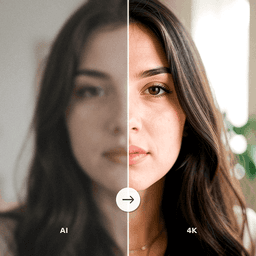
Fix Your Photo Colors with AI
ClearPastAI offers intelligent AI color correction that instantly fixes white balance, restores faded colors, and balances your photos for natural, professional-looking results. Download the app and see your photos in their true colors.
Free to try. No account required.